Denny's Home World

  • Subscribe to our RSS feed.
  • Twitter
  • StumbleUpon
  • Reddit
  • Facebook
  • Digg

Friday, 27 January 2012

Moonlight in Firefox or Chrome on Ubuntu

Posted on 06:59 by Unknown


Moonlight is a Silverlight alternative available for Linux users from the fine people at Novell.

This How To is designed for use on Ubuntu 11.10 using either Firefox 9.0.1, or Chrome (Chromium) version 15.

First I installed libmono-wcf3.0-cil. If you use Synaptic or Ubuntu's Software Center, you can find this by either searching for mono or Moonlight.

You can also install this with apt-get by typing the command: sudo apt-get install libmono-wcf3.0-cil in your terminal window. (Control alt t, unless your using xfce.)

*** This section is for Firefox only ***

I installed a Firefox plugin called:

Disable Add-on Compatibility Checks 1.3
by Kris Maglione

Reinstates the extensions.checkCompatibility preference without respect to the current application version.

This is needed because technically the Moonlight plugin is not yet considered compatible with Firefox 9.0.1., as well as many other versions of Firefox.

I have never had a problem with Moonlight running in this fashion though.

Firefox will ask you if you trust these plugins. Say yes to continue, or this process won't work.

I have never had any problems with viruses or any other intrusions from these authors.

You can find "Disable Add-on Compatibility Checks 1.3" here: https://addons.mozilla.org/en-US/firefox/addon/checkcompatibility/?src=search

Once that is installed, then we want to install the Moonlight plugin.

*** This section is for both Firefox and Chrome ***

You can get Moonlight here: http://www.go-mono.com/moonlight/

Again Firefox asks if you trust the author, which in this case is Novell, who is very trustworthy.

Chrome will display a warning on the bottom of the page. You must allow the download for this process to work.

Once this is accomplished you will need to restart Firefox. Chrome should not need a restart.

If you want to test your newly installed Moonlight plugin, I suggest using this page:

http://www.bubblemark.com/

I suggest you use this test: Silverlight 3.0 (CLR, CacheMode="BitmapCache")

The reason I suggest that particular test is that your new Moonlight plugin should now handle Silverlight 3.0 extensions with ease, so this is a decent test for our new plugin.

If you see the balls floating, you are the proud owner of a functioning Moonlight plugin.

I hope this has been useful to you, if you have any questions, please feel free to email me at dennygoot@gmail.com.

Read More
Posted in | No comments

Tuesday, 3 January 2012

Canonical's "Jumpstart"

Posted on 13:21 by Unknown
I went to Ubuntu.com just to check out what's happening, and I was greeted with this:

An Ubuntu private cloud within 5 days

Five days.
$9,000.
One fully-functioning cloud.

I started reading about it, and it sounds like a great way to get a service up and running on the order of a music store, facebook, twitter, or maybe something like sourceforge.

 I like that Canonical is working Ubuntu into a multi headed multi platformed system, not just for us computer geeks.

I also noted that Ubuntu has hit the 20 million mark for users. While I know that this is a drop in the bucket in comparison to Microsoft (I so wanted to call it Microshaft or something else not very flattering to MS, but...)

As a side note I have gravitated toward Xubuntu LTS releases for my customers. The stability of the LTS releases along with XFCE having a feel they are used to seems to be a win win.

Read More
Posted in | No comments

Thursday, 17 November 2011

Must have console apps

Posted on 09:48 by Unknown
I thought I would write about my favorite console apps.

Most of the apps I have chosen are installed for that occasion when x dies or something like that, and I am stranded in the console.

I have found it a good idea to install these apps before your computer has that painful disaster.

Midnight Commander (sudo apt-get install mc)

GNU Midnight Commander (mc) is a free cross-platform orthodox file manager and a clone of Norton Commander originally created by Miguel de Icaza.
Midnight Commander is licensed under the terms of the GNU General Public License.
(Thanks to Wikipedia for this data)


MC is sooo useful. If you are stranded in the console, you can fly around the hard drive's folder structure with ease. It makes a lot less work than using the console comands to navigate folder structure. (ls, cd, is so slow.)

Htop (sudo apt-get install htop)

This is htop, an interactive process viewer for Linux. It is a text-mode application (for console or X terminals) and requires ncurses. Tested with Linux 2.4 and 2.6.


Although this is part of my tool kit for fixing things in console, I find myself using htop when x is running fine, but some app I ran has locked up. It runs faster than the other gui process viewers, and is easy to hunt down and kill that rogue app. (Which always seems to be a Wine app.)

IRSSI (sudo apt-get install irssi)

Irssi is an Internet Relay Chat (IRC) client. It is a text-based client as it lacks a graphical user interface (gui) such as XChat, Chatzilla and others. It was written from scratch using the C programming language, and was designed to run on Unix-like operating systems. It has been ported to the Windows platform using Cygwin, and for the Macintosh under the name MacIrssi.

This is your life line. If you are stuck in console, you can still reach the helpful hands at irc.freenode.org, channel #ubuntu.


If you don't have an account at irc.freenode.org, that's fine, the server will just give you a name like Guest12345.

To connect with IRSSI, type /connect irc.freenode.org.

If you have an account with freenode.org, and you want to use it, you will first need to change your nick with /nick (yournick).

My nick is hylian, so for me it wold be /nick hylian

Then you will have to supply identification to nickserv.

You do that by typing /msg nickserv identify (your password)

Once you are either using a Guest account or your own freenode.org account, you then need to join a channel.

To do this type /join #ubuntu

Always be polite, and always just ask your question. (Don't ask them if it's ok to ask them a question)

Links (sudo apt-get install links)

Links 2  is  a  text mode WWW browser with ncurses interface, supporting colors, correct table rendering, background  downloading,  menu  driven configuration interface and slim code.

Frames  are  supported.  You can have different file formats associated with external viewers. mailto: and telnet: are supported  via  external clients.

Links 2 can handle local (file://) or remote (http:// or ftp://) URLs.
(modified a little from man links)


Just for clarity, this is the non x version. They make a www browser called X Links 2, also a very good browser.

Links is another very usefull tool. If you are stranded in the console, you can still research your problem via google.com, duckduckgo.com, etc..

The next section of console apps are not related to computer repair, but are just apps I enjoy.


MOC (sudo apt-get install moc) (runs with the mocp command, not moc.)

MOC (music on console) is a console audio player for LINUX/UNIX designed to be powerful and easy to use.

You just need to select a file from some directory using the menu similar to Midnight Commander, and MOC will start playing all files in this directory beginning from the chosen file. There is no need to create play lists like in other players.

If you want to combine some files from one or few directories on one play list, you can do this. The play list will be remembered between runs or you can save it as an m3u file to load it whenever you want.

Need the console where MOC is running for more important things? Need to close the X terminal emulator? You don't have to stop playing - just press q and the interface will be detached leaving the server running.

You can attach it later, or you can attach one interface in the console, and another in the X terminal emulator, no need to switch just to play another file.

MOC plays smoothly, regardless of system or I/O load because it uses the output buffer in a separate thread. It doesn't cause gaps between files, because the next file to be played is precached while playing the current file.

Internet stream (Icecast, Shoutcast) are supported.


What I like most about moc is that i can set it, press q, and it will continue to play without terminal being open or having an interface. To make changes like turning MOC off or changing the song, volume, etc.. you just open the terminal and type mocp again. Capital Q shuts it off.

Mplayer (sudo apt-get install mplayer) (May need extra gstreamer codecs for some audio and video types)


MPlayer is a movie player which runs on many systems (see the documentation). It plays most MPEG/VOB, AVI, Ogg/OGM, VIVO, ASF/WMA/WMV, QT/MOV/MP4, RealMedia, Matroska, NUT, NuppelVideo, FLI, YUV4MPEG, FILM, RoQ, PVA files, supported by many native, XAnim, and Win32 DLL codecs. You can watch VideoCD, SVCD, DVD, 3ivx, DivX 3/4/5, WMV and even H.264 movies.

Another great feature of MPlayer is the wide range of supported output drivers. It works with X11, Xv, DGA, OpenGL, SVGAlib, fbdev, AAlib, DirectFB, but you can use GGI, SDL (and this way all their drivers), VESA (on every VESA compatible card, even without X11!) and some low level card-specific drivers (for Matrox, 3Dfx and ATI), too! Most of them support software or hardware scaling, so you can enjoy movies in fullscreen. MPlayer supports displaying through some hardware MPEG decoder boards, such as the Siemens DVB, DXR2 and DXR3/Hollywood+.

MPlayer has an onscreen display (OSD) for status information, nice big antialiased shaded subtitles and visual feedback for keyboard controls. European/ISO 8859-1,2 (Hungarian, English, Czech, etc), Cyrillic and Korean fonts are supported along with 12 subtitle formats (MicroDVD, SubRip, OGM, SubViewer, Sami, VPlayer, RT, SSA, AQTitle, JACOsub, PJS and our own: MPsub). DVD subtitles (SPU streams, VOBsub and Closed Captions) are supported as well.


I use mplayer for playing ShoutCast audio streams (as shown in the screenshot) and for playing the music in .flv music video files in the console, which can be accomplished with mplayer --novideo (filename).

Cowsay (sudo apt-get install cowsay)

Cowsay is entirely useless, and pretty fun.

If you type cowsay Hello World!  you will get a cow saying "Hello World!".

There are actually a lot of commands for cowsay, changing everything from the kind of cow you get, to how the eyes look, and even replacing the cow with things like Tux the Linux mascot, or Calvin from Calvin and Hobbes, just to name a few.


There is also a cowthink app that will act like cowsay but give the cow a cartoony thought bubble.


I used cowsay to add a little shameless Denny's Homeworld plug, as seen here:


(I added the apostrophe afterwards)

Does it have a use? Not really, unless your very creative. Maybe a command that uses fortune with cowsay to display useful hints and tips on how to use your newly programmed console app?

BSD-Games (sudo apt-get install bsdgames)

BSD Games is a collection of the classic text based games distributed with some BSDs like FreeBSD and NetBSD.
The included games are, alphabetically:
  • adventure - an exploration game
  • arithmetic - quiz on simple arithmetic
  • atc - air traffic controller game
  • backgammon - the game of backgammon
  • banner - print large banner on printer
  • battlestar - a tropical adventure game
  • bcd - reformat input as punch cards, paper tape or morse code
  • boggle - word search game
  • caesar - decrypt caesar cyphers
  • canfield - the solitaire card game canfield
  • cfscores - show scores for canfield
  • cribbage - the card game cribbage
  • fish - play Go Fish
  • gomoku - game of 5 in a row
  • hangman - Computer version of the game hangman
  • hunt - a multi-player multi-terminal game
  • huntd - hunt daemon, back-end for hunt game
  • mille - play Mille Bornes
  • monop - Monopoly game
  • morse - reformat input as punch cards, paper tape or morse code
  • number - convert Arabic numerals to English
  • phantasia - an interterminal fantasy game
  • pom - display the phase of the moon
  • ppt - reformat input as punch cards, paper tape or morse code
  • primes - generate primes
  • quiz - random knowledge tests
  • rain - animated raindrops display
  • random - random lines from a file or random numbers
  • robots - fight off villainous robots
  • rot13 - rot13 encrypt/decrypt
  • sail - multi-user wooden ships and iron men
  • snake - display chase game
  • teachgammon - learn to play backgammon
  • tetris-bsd - the game of tetris
  • trek - trekkie game
  • wargames - shall we play a game?
  • worm - Play the growing worm game
  • worms - animate worms on a display terminal
  • wtf - translates acronyms for you
  • wump - hunt the wumpus in an underground cave 
Personally I only use this to play Boggle. Hangman is kind of fun too, and yes, I have even played go-fish.

I have to admit this is one of the strangest collections of "games" I have ever seen.

How generating primes or ascii rain drops constitutes a game, I will never know.


Above all, my most used console app is apt-get. I made mention of the proper codes to install these. Apt-get is so usefull for installing Ubuntu apps, whether they be graphical or not.

It's also the fastest way, if you know the name of the repository it installs from, to install any app on Ubuntu.

I hope these apps bring you help and enjoyment.
Read More
Posted in | No comments

Wednesday, 19 October 2011

Watchtower Library under Ubuntu 11.10

Posted on 20:51 by Unknown

*** Added extra info as of Nov 6th, 2011 ***

*** Added extra info as of Nov 9th, 2011 ***

*** Added extra info as of Nov 10th, 2011 ***

I have had several comments mailed to me about the Watchtower Library not functioning in Ubuntu 11.10.

I've been able to get it to work by using the desktop config file created during install of the library. (The file with the Watchtower Library icon on it, on the desktop.)

I hid the file in my home folder to keep the icon out of the way, so I did not delete the file on accident, so this is optional.

If you are interested in this option, I did it by using a hidden folder. You can do this by right clicking in your home folder, choosing add folder, and when naming it add a period before the name, i.e. .hidden, is a hidden folder named hidden.

You can see the folder again by holding control and typing h.

Run the library using the icon, and then I suggest while the library is running you go to the bar on the left, right click the library icon, and choose "keep in launcher".

again this is optional, but if you use the library as much as I do, it will pay off in spades later.

If the icon does not launch, then right click it, choose properties, and then click  on the permissions tab,which will be on the top left of the properties window you just opened.

Then if the "Allow executing the file as a program" is not checked, then check it.

Press close, and try to run the library through the desktop config file again.

If you disposed of the file, then I have a copy of mine available here:
Denny's Linux Box File Storage

If your browser does not offer to download the file, then you can choose file, and then save page as, or ctrl s in most cases. make sure to save the page as "Watchtower Library 2010 - English.desktop"

If you have to use my file, you will have to make a small change.

This file is designed around my user name, denny.

If your user name is different, and most likely it is, then you will have to edit the file. you can do this by right clicking the file and choosing properties.

in the 'command:' box, it will say this:

env WINEPREFIX="/home/denny/.wine" wine C:\\Program\ Files\\Watchtower\\Watchtower\ Library\ 2010\\E\\WTLibrary.exe

if your user name is peter, for instance, then you will have to change the line to read:

env WINEPREFIX="/home/peter/.wine" wine C:\\Program\ Files\\Watchtower\\Watchtower\ Library\ 2010\\E\\WTLibrary.exe 

This is the extent of my knowledge currently, since I have not had this problem personally. If anyone gets this error, and can get me the error reports from wine, I may be able to continue helping you.

Please feel free to comment here or e-mail me at dennygoot@gmail.com.


Added Nov 6th, 2011. 

I wanted to mention that one of the causes of the library not functioning is a problem with wine not recognizing where the dll's for the library are.

This doesn't happen all the time, and didn't happen to me on my install, so I assumed that the old problem no longer existed. 

Thanks to a brother named Andrew that wrote me about this very same problem, I am posting my fix here.

Copy the dll's from the /home/denny/.wine/drive_c/Program Files/Watchtower/MEPS Platform 2.3/ folder to the /home/denny/.wine/drive_c/windows/system32/ folder.

You may need a complete reboot for this problem to be solved. I also have added these same dll's to the /home/denny/.wine/drive_c/windows/system/ folder. (This should not be neccessary, I am just always taking extra steps just to make sure problems don't arise.)

Keep in mind once again my username denny should be replaced with your username. (i.e. paul, would be /home/paul/.wine/drive_c/etc... )

Also keep in mind that the wine folder is hidden (hence the .wine, instead of wine folder name), which means you might have to hold control and type h to see the wine folder.

Again, if there is any problems with this work around please email me at dennygoot@gmail.com.

Added Nov 9th, 2011

Dave, an Ubuntu user from the Hartlepool South congregation in N.E. England  has just succeeded in installing the Watchtower library on Ubuntu 11.10 (after some difficulty). 

Thanks to Dave, here are some tips if you still don't have the library running, in Dave's own words:

Here's what DID NOT work:

1. Open terminal, type sudo apt-get install wine1.3 (neither did wine1.2) Watchtower library installed but would not run. Sadly, swapping dlls around did not help as per Andrew's suggestion.

2. Using Synaptic Package Manager to install Wine.

So here's what I did - I completely removed every last vestige of Wine from my PC.

1. Firstly I used Synaptic to un-install Wine but this did not remove it completely.

2. So using the terminal I entered sudo apt-get purge wine1.3

3. Then I sudo apt-get purge wine1.2

4. Then sudo apt-get autoremove to get rid of all other Wine-related programs.

5. Then I went to http://www.winehq.org/download/ubuntu and followed the instructions to the letter.

Following "I completely removed every last vestige of Wine from my PC." I should have added that I deleted the hidden folder .Wine in my home folder.

Also, I used the Alternative Command Line Instructions for installing Wine.

I now have the Watchtower library up and running just fine.

Best regards,
Dave

Added Nov 10th, 2011:

A brother in my kingdom hall had this very same problem, and this fix mentioned at wine hq solved it.

In terminal (hold control, alt, and press t) i typed this in:
rm ~/.wine/drive_c/windows/winsxs/manifests/*.vc90.*_deadbeef.manifest

After running that command, type exit in the terminal, and try running the library again.

As a side note, I worked out this command on my machine, it will copy the dll's over for you automatically:

cp /home/*/.wine/drive_c/Program\ Files/Watchtower/MEPS\ Platform\ 2.3/*.dll /home/*/.wine/drive_c/windows/system32/

It worked for my brother, perhaps this is your issue too.


Thank you Andrew and Dave for helping me and others to solve this problem!

-Denny :)


This is how my set up looks like after my work around:
Read More
Posted in | No comments

Monday, 12 September 2011

SDF a great free UNIX shell

Posted on 20:04 by Unknown


This is my shell, my home away from home...

Here is what SDF has to say about itself:

" The Super Dimension Fortress is a networked community of free
software authors, teachers, librarians, students, researchers, hobbyists,
computer enthusiasts, the aural and visually impaired. It is operated
as a recognized non-profit 501(c)(7) and is supported by its members.

Our mission is to provide remotely accessible computing facilities for
the advancement of public education, cultural enrichment, scientific
research and recreation. Members can interact electronically with each
other regardless of their location using passive or interactive forums.
Further purposes include the recreational exchange of information
concerning the Liberal and Fine Arts.

Members have UNIX shell access to games, email, usenet, chat, bboard,
webspace, gopherspace, programming utilities, archivers, browsers, and
more. The SDF community is made up of caring, highly skilled people
who operate behind the scenes to maintain a non-commercial INTERNET."

If you are interested in diving into this unique group of people from all walks of life, then go here:

http://sdf.org/

And remember to click on this:

***To create your own free shell account click here***
Read More
Posted in | No comments

Wednesday, 31 August 2011

Mageia, a fork of Mandriva

Posted on 15:40 by Unknown


Mandriva is one of my favorite Linux based operating systems.

But Mandriva has had some serious problems in the past year or two that has shaken users and developers confidence in it.

That is why I want to bring out a new fork to Mandriva who's sole purpose is to work around those failings, and develop a system for which the users, designers, developers, packagers, translators, testers, and advocates can have a say as to how it is developed.

It is also not orientated around business. It's not owned by an entity trying to make financial gain on the project, it's owned by a not for profit organization.

It's called Mageia.

I personally find this idea very freeing.

If your a fan of Mandriva, but have had concerns about it's direction or lack of development, then I encourage you to give it a try.

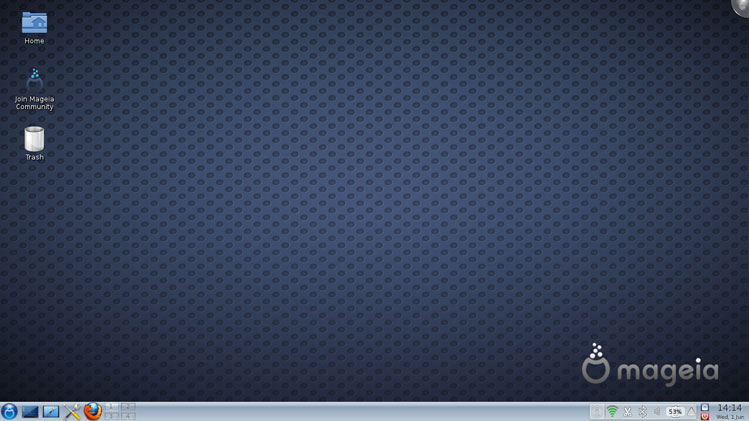
Here is a screenshot of the operating system:


If you are interested in downloading it or reading more about it, their website is http://www.mageia.org/

I also suggest you read the article they wrote about the foundation behind the group making Mageia. I think you will find it's well thought over and will give the project strength.

It's available here: http://www.mageia.org/en/about/2010-sept-announcement.html

Read More
Posted in | No comments

Monday, 29 August 2011

Minitube, Youtube in style!

Posted on 10:08 by Unknown


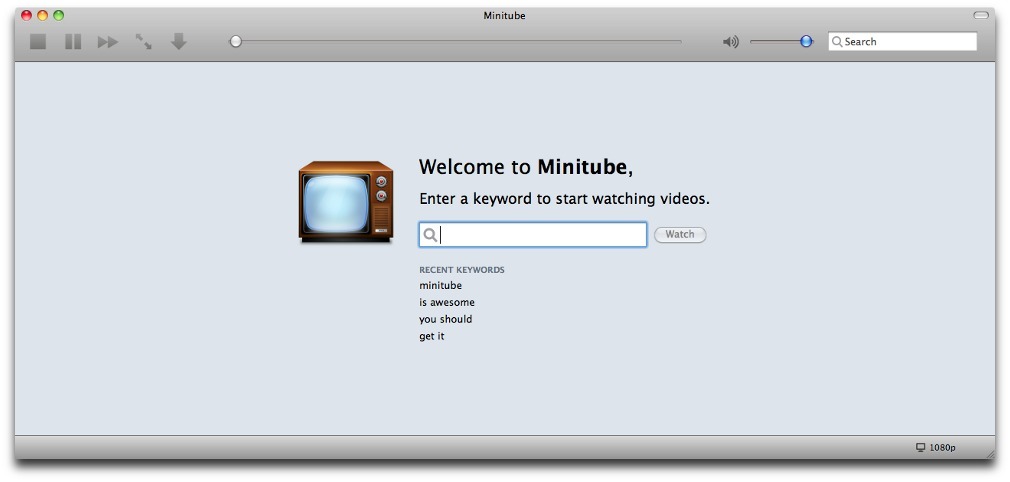
If you are like me, and not a huge fan of installing the flashplayer plugin to watch Youtube videos, then I suggest you try Minitube!

It does not use flash to view the Youtube videos, and in my opinion works much better than Youtube on Firefox or Chrome with Flashplayer plugin installed.

"Minitube is a YouTube desktop application.

With it you can watch YouTube videos in a new way: you type a keyword, Minitube gives you an endless video stream.

Minitube is not about cloning the original YouTube web interface, it aims to create a new TV-like experience. " -Minitube's Website

I suggest that whether you are a Windows, Mac OS, Linux or Other operating system user, that you download it directly from the Minitube Website, especially if your a Ubuntu user, because the version in the repos is too old, and doesn't work properly.


Read More
Posted in | No comments
Newer Posts Older Posts Home
Subscribe to: Posts (Atom)

Popular Posts

  • Windows Really Good Edition
    While rummaging through the internet, I found this quirky website:  http://www.deanliou.com/WinRG/WinRG2.htm If you miss the days of Win 95,...
  • 15 Web Alternatives to Popular Desktop Software
    I stumbled upon this in the most unlikely of places, StumbleUpon.com . All kidding aside, This article opened my eyes. I didn't realize ...
  • Duck Duck Go search engine
    I found this while wading knee deep in an Ubuntu forum. Duck Duck Go is a search engine designed to have the minimalistic look of google, bu...
  • Linux powered pen intended for saving handwriting
    The German company Lernstift has created a pen that vibrates when you make grammatical errors or hand writing ones. The purpose is to help p...
  • VBA 32 Rescue, a usb key/cd virus tool for Windows
    I love it when Linux technology is used in unique ways.  This is one of my favorite ways, taking Linux, and a handful of apps, and repairing...
  • VLC Media Player
    I wanted to talk about VLC Media Player today, have you ever been looking for that program that plays all your media? something that will pl...
  • Urukrama, your guide to Openbox
      I am forever not happy with my desktop. It seems I have to change it at least once a month. More often than not I find myself going back t...
  • NSA asked for backdoor to Linux
    "Far from being a rumor, word of the approach comes via Linus’ father, Nils Torvalds. As a Member of the European Parliament (MEP), Nil...
  • Rock solid Fedora hits a mile stone
    "Dear Fedora fans, it's time to celebrate 10 years of Fedora Linux, as ten years ago, on September 23, 2003, Michael K. Johnson ann...
  • Free Download Manager
    I found this while scrounging around the net for a decent downloader, and I think i found a gem. FDM allows you to restart most downloads, i...

Categories

  • 04
  • 12
  • IRC
  • Irssi
  • kernel
  • Menu
  • Ubuntu
  • update
  • upgrade
  • Whisker
  • XFCE
  • Xubuntu

Blog Archive

  • ▼  2013 (44)
    • ▼  December (2)
      • Ubuntu 12.04 LTS gets major kernel updates
      • Whisker Menu, an excellent XFCE menu option
    • ►  November (10)
    • ►  October (3)
    • ►  September (9)
    • ►  August (2)
    • ►  July (8)
    • ►  May (2)
    • ►  April (2)
    • ►  March (2)
    • ►  February (2)
    • ►  January (2)
  • ►  2012 (32)
    • ►  December (2)
    • ►  November (2)
    • ►  October (3)
    • ►  September (2)
    • ►  August (1)
    • ►  July (5)
    • ►  June (6)
    • ►  May (3)
    • ►  April (4)
    • ►  March (2)
    • ►  January (2)
  • ►  2011 (25)
    • ►  November (1)
    • ►  October (1)
    • ►  September (1)
    • ►  August (7)
    • ►  July (2)
    • ►  June (3)
    • ►  May (2)
    • ►  April (1)
    • ►  March (1)
    • ►  February (5)
    • ►  January (1)
  • ►  2010 (14)
    • ►  December (1)
    • ►  November (2)
    • ►  October (2)
    • ►  September (1)
    • ►  July (3)
    • ►  June (1)
    • ►  May (1)
    • ►  April (2)
    • ►  January (1)
  • ►  2009 (4)
    • ►  December (3)
    • ►  October (1)
Powered by Blogger.

About Me

Unknown
View my complete profile